
The problem
Unlike most of North America, British Columbia keeps alcohol retail inside a tightly regulated set of channels: government-run BC Liquor Stores, licensed private liquor stores, a limited grocery-store model open only to large qualifying stores, and on-site sales at local breweries and wineries. Convenience stores are not eligible at all. The result is a fragmented landscape with no single place to compare products or prices.
For consumers, this means browsing multiple separate retail websites to find a specific bottle, compare prices, or get a reliable pairing recommendation. For restaurants and bars, it's worse: hiring a sommelier or beverage consultant costs CAD $150–300+ per hour, prohibitive for the small and mid-size establishments that make up the majority of Vancouver's F&B scene. Most end up building drink menus by gut feel, missing pairings that would increase per-table revenue.
This gap is about to widen. In May 2026 British Columbia launched a three-year trial, running to June 2029, allowing licensed establishments to purchase alcohol directly from BC Liquor Stores and private retailers instead of exclusively through wholesalers. Restaurants can now restock on demand from any retailer, but they have no tool to discover what's actually available, compare prices across stores, or figure out what pairs with their food menu.
Our solution
Vancouver Sommelier AI is a multi-agent AI drinks concierge that searches real-time inventory across every major Vancouver-area retailer, provides expert pairing recommendations backed by cited sources, and designs complete beverage menus from a food menu photo.
Key capabilities:
- Real-time inventory search. Every query searches all integrated Vancouver retailers in parallel, spanning government-run stores, private wine shops, and specialty merchants, so an answer reflects what is actually on the shelf rather than what the model remembers.
- Expert pairing & knowledge. Sommelier-grade food-and-drink pairing across wine, beer, spirits, cider, sake, and cocktails, backed by web grounding with cited sources.
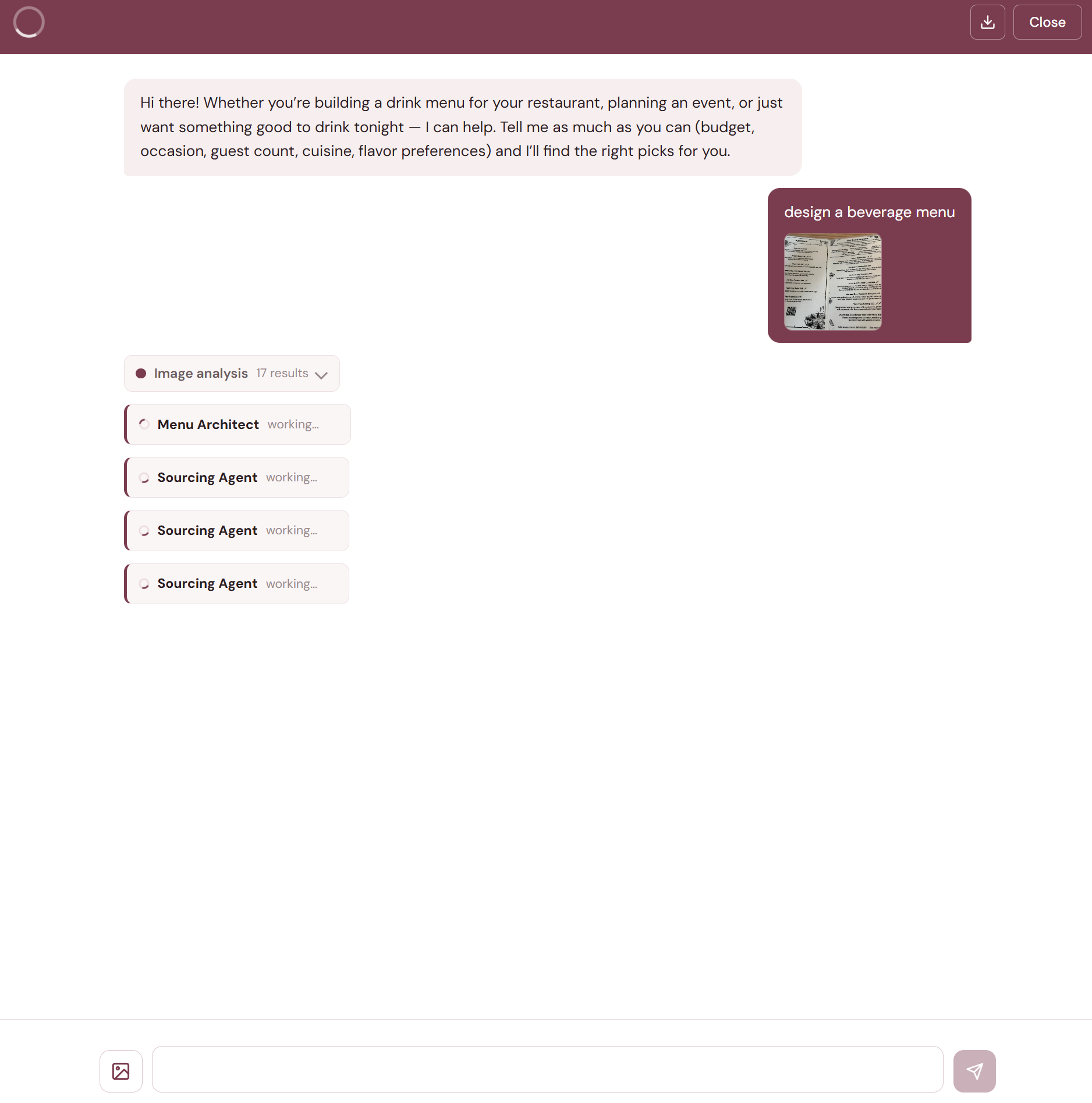
- B2B Menu Architect. Upload a food menu photo and the agent reads it with computer vision, designs a beverage program by course, then sources every recommended product with real prices from local retailers.
- Multimodal vision. Scan a wine label for instant reviews and local pricing, or a restaurant wine list for value comparison.
- Human-in-the-loop clarification. When the request is ambiguous, the agent asks the user to clarify rather than guessing.
- Multilingual. Responds in the user's language, including English, Korean, Chinese, and Japanese.
See it run
Multi-agent architecture
Early prototypes used a single monolithic ReAct loop with all tools available. It worked, but the agent confused sourcing data with pairing opinions, hallucinated more often, and was harder to debug. Splitting into focused specialists solved all three problems.
The system uses a LangGraph Supervisor pattern: a central orchestrator receives each query and routes to 3 specialist agents, each running as an independent ReAct sub-graph with its own narrow prompt and tool set.
The models are tiered by workload. The Supervisor, Sourcing Agent, validation gate, and vision node run on Gemini 3.5 Flash, because routing, search orchestration, and extraction need speed more than depth. The reasoning-heavy specialists, Sommelier and Menu Architect, run on Gemini 3.1 Pro. Fast where latency matters, capable where judgment matters.
| Agent | Role | Tools |
|---|---|---|
| Supervisor | Query routing, specialist coordination, final answer synthesis, owns clarification | 3 specialist agents + clarification |
| Sourcing Agent | Inventory, pricing, where-to-buy, with parallel calls to every integrated retailer on every query | Six retailer search tools, consumed over MCP |
| Sommelier Agent | Pairing recommendations, drinks knowledge, reviews and scores with cited sources | Pairing reasoning + web grounding |
| Menu Architect | B2B beverage menu design from a food menu, sourcing real products via direct delegation | Sourcing Agent (direct hand-off) + web grounding |
The Supervisor merges specialist results into one sourced, verified answer. The Menu Architect delegates directly to the Sourcing Agent, which is exposed to it as a tool, so verifying real product availability runs as an inner loop with no Supervisor mediation.
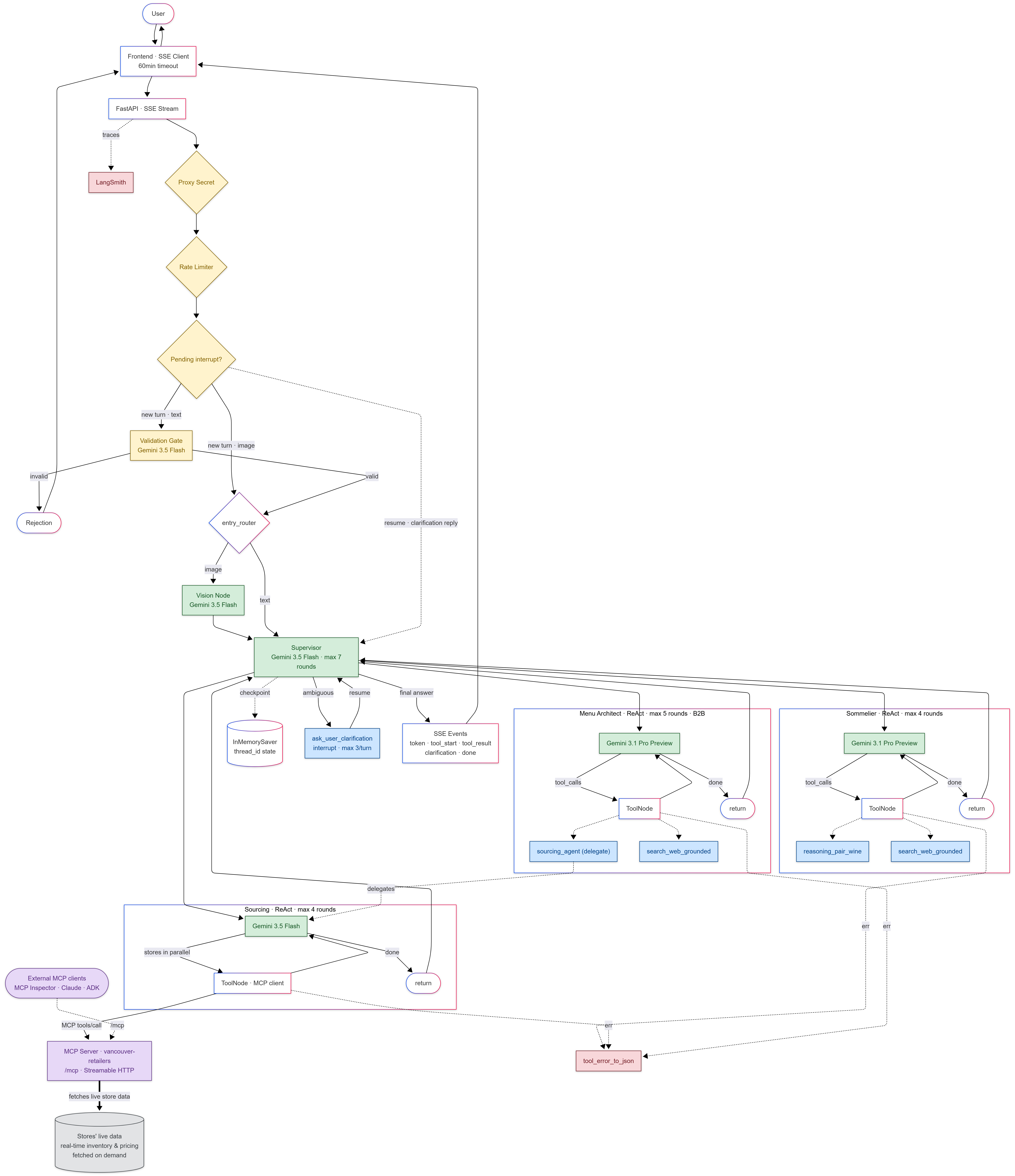
Three components sit outside the core specialist loop:
- Validation Gate. A lightweight LLM call classifies whether the query is in scope before the full agent graph starts. Off-topic queries get a polite rejection in the user's language without wasting a full agent run.
- Vision Node. When the user attaches a photo, an entry router detects the image and sends it through structured output extraction before the Supervisor. The vision node reads wine labels, restaurant wine lists, or food menus and folds the extracted text into the conversation.
- Human-in-the-Loop Clarification. When the query is ambiguous, the Supervisor can interrupt the graph and ask the user a follow-up question with clickable option chips, then resume exactly where it left off.
Real-time sourcing
The Sourcing Agent's prompt forces parallel calls to every integrated retailer on every query. Without this constraint, the LLM would call one store, get results, and stop, missing better prices elsewhere. A response citing only one source is treated as a failure.
The six integrated retail chains span government-run liquor stores, private wine shops, and specialty merchants across dozens of Vancouver-area locations. Each retailer has a different backend (REST, GraphQL, and platform-specific APIs) but the agent handles them uniformly through dedicated tool wrappers that normalize products, prices, and stock data into a consistent format.
A single pairing question exercises the whole graph. Ask "what pairs with grilled salmon" and the Supervisor fans out immediately: the Sommelier Agent reasons about acidity, weight, and how a smoky char interacts with an oily fish, while the Sourcing Agent queries every integrated retailer at once for what is actually on the shelf. Neither waits for the other. The Supervisor then merges the two streams into one answer. The pairing rationale carries the reasoning and the sourcing results carry availability, so the recommendation is grounded in stock that exists rather than a bottle the model remembers from training data.
Error isolation
Any retailer can timeout or error at any time. Every tool exception is caught and converted into a structured error result that the orchestrator reads like a normal response. If one source is down, the agent answers from whichever stores did respond. The Supervisor's prompt explicitly instructs it to never abandon a turn because of a partial failure: use what succeeded, mention the gap briefly, move on.
Serving the tools over MCP
The retailer search tools are not bound to the agent in-process. They are served by a dedicated Model Context Protocol (MCP) server and consumed over the protocol. The server exposes all six retailer tools over Streamable HTTP with the exact same names, schemas, and JSON result envelopes as the original in-process wrappers, and it's mounted inside the same backend at /mcp, so one container serves both the chat API and the MCP endpoint.
The interesting part: the Sourcing Agent is itself an MCP client. At first use it loads its toolset from the MCP server via a self-connection to the mounted endpoint. Each tool invocation opens its own short-lived MCP session, so the all-retailers-in-parallel fan-out stays fully parallel over the protocol. And if the endpoint is unreachable, the loader falls back to the in-process tools: same tools, different transport, no lost turns.
Why put a protocol boundary in front of tools the agent could simply import? Interoperability. Any MCP-capable client, whether MCP Inspector, Claude Desktop, or another team's agent, can discover and call the same tool surface our agent uses, which makes the integration reusable instead of locked inside one codebase. The tools are read-only searches, and direct access to the backend is rejected without a secret header that only our edge proxy injects.
Making it conversational
A search engine returns results. A conversational agent understands context. The difference matters when someone says "the second one" or "something cheaper", references that only make sense in context of what came before.
Multi-turn memory
LangGraph's checkpointing system gives us conversation memory, with each turn's messages saved to a thread-specific checkpoint. When the user sends a follow-up, the full conversation history is loaded and the Supervisor can resolve references like "that Pinot Noir you mentioned" or "do they have it at another store?"
We deliberately chose ephemeral sessions: closing and reopening the chat starts a clean thread. An earlier design persisted threads across visits, but context from previous conversations leaked into new ones. Someone asking about Riesling would get irrelevant data from last week's chat polluting the context.
Multi-turn context also needs active filtering. Passing all intermediate tool calls and results from prior turns into the next turn bloated context and confused the LLM. A filtering function strips prior turns down to just the user message and final answer, keeping the current turn's full tool chain intact.
Knowing when to ask
Not every question has a clear answer path. "Recommend me a good wine" could mean anything. Instead of guessing, the agent can pause the graph, ask for clarification with selectable option chips, and resume once the user responds.
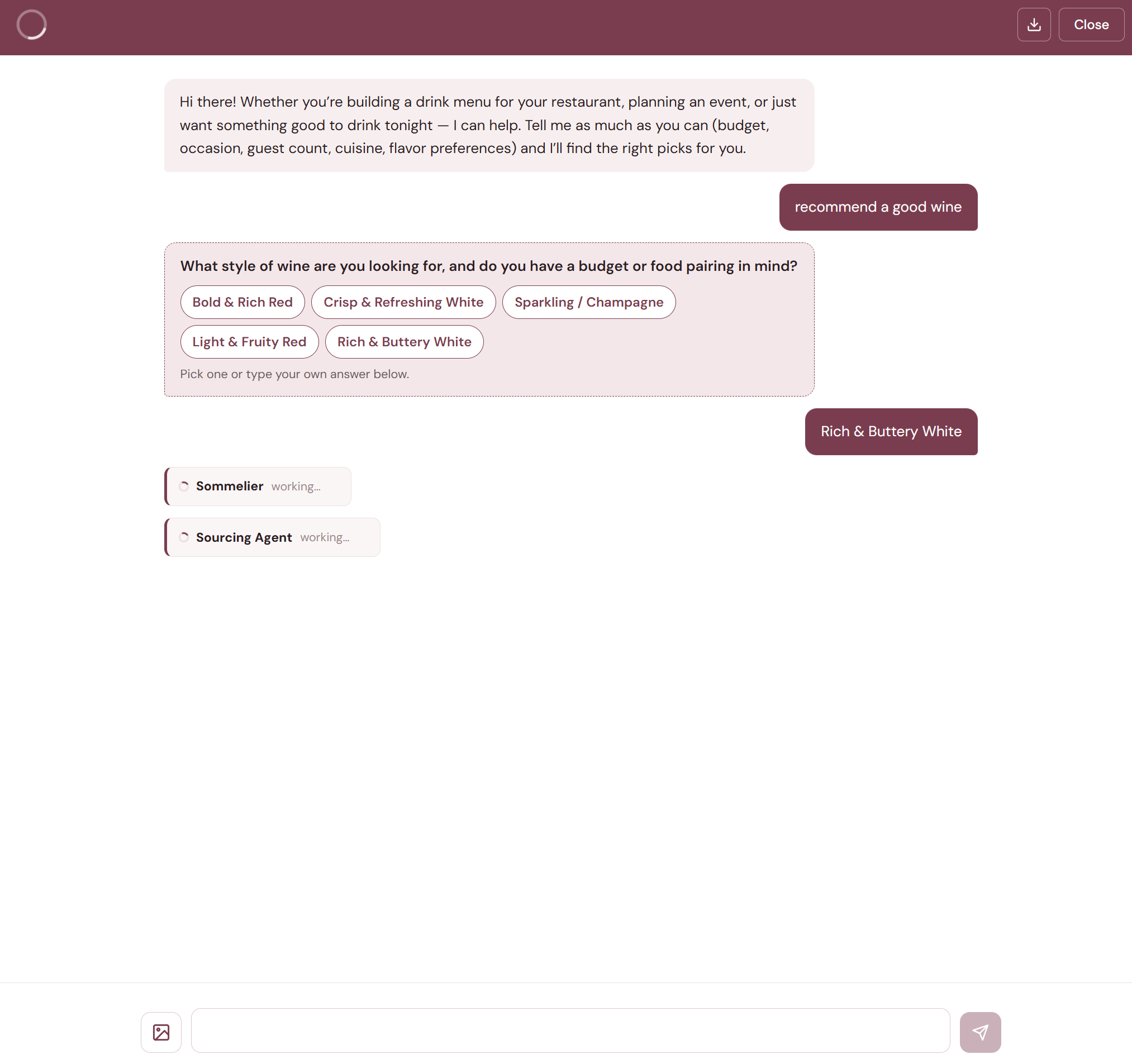
This uses LangGraph's interrupt() primitive. The tool raises an interrupt, the graph checkpoints its current state, and the backend sends the question to the frontend as a special SSE event. When the user responds, the graph resumes from exactly where it stopped, with no repeated work.
Vague queries like "recommend a good wine" initially produced generic answers. Adding interrupt-based clarification with clickable options (budget? occasion? style?) dramatically improved answer relevance. Users prefer one follow-up question over a wall of generic recommendations.
Vision: wine labels, wine lists, and food menus
Not every question starts with text. Sometimes you're holding a bottle and wondering whether it's worth the price. Sometimes you're staring at a restaurant wine list wanting to know which wines are the best value. And for the B2B use case, restaurant operators don't type out their menu, they snap a photo.
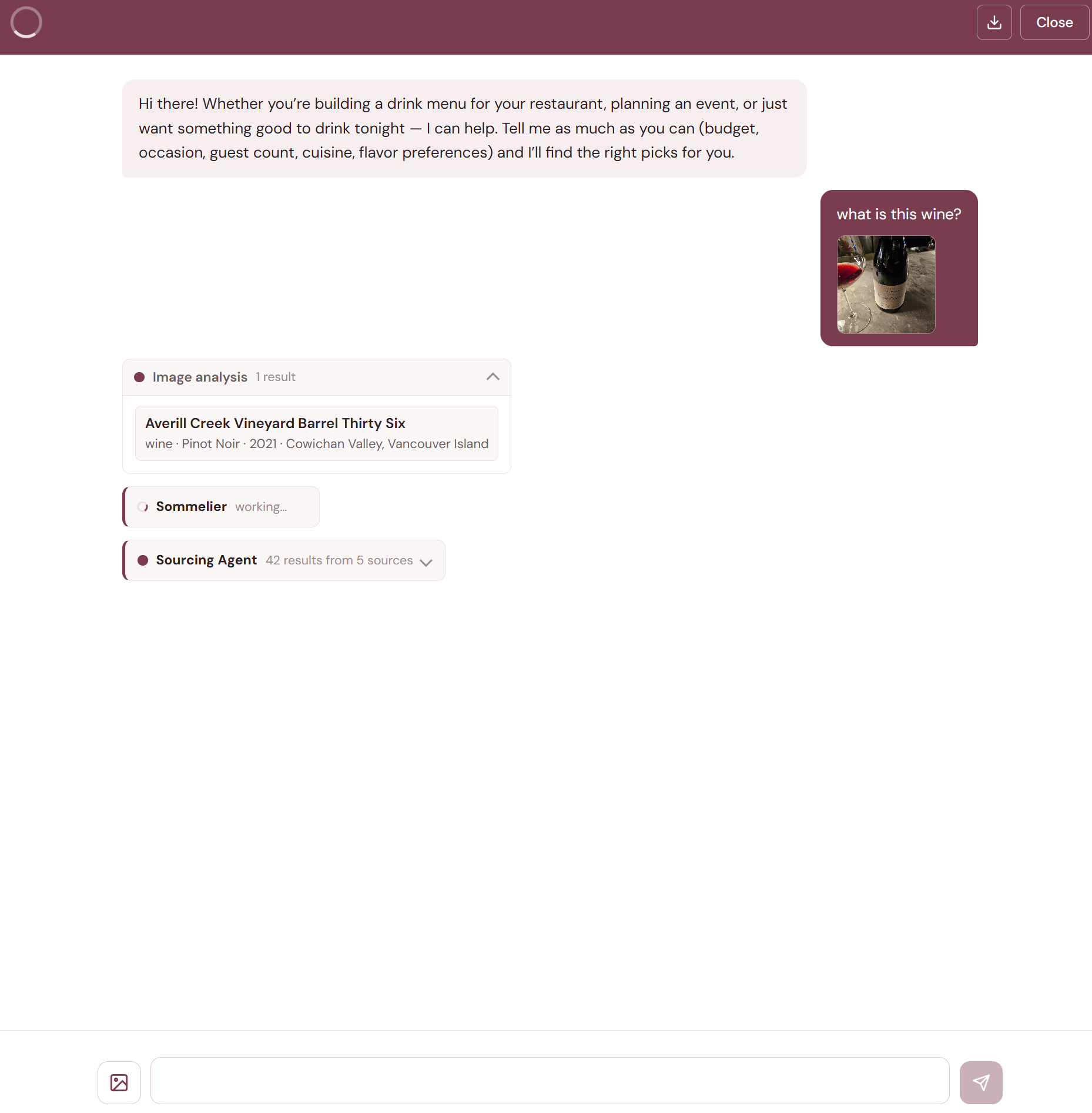
When a user attaches a photo, the frontend downscales it and sends it as base64. An entry router detects the image and routes it to the vision node, which uses structured output extraction to pull out exactly the fields needed: producer, wine name, varietal, vintage, region. The extraction is deliberately conservative: only what is visibly printed on the label, never normalized or guessed.
After extraction, the vision node replaces the image in the conversation with its text representation, so image bytes don't persist in the context window, saving tokens on every subsequent round.
Menu Architect: the B2B use case
The Menu Architect only became practical when we added multimodal photo scanning. Upload a food menu photo and the vision node extracts dishes with structured fields. The Menu Architect then designs pairings by course across wine, beer, spirits, and sake, and delegates directly to the Sourcing Agent to verify every recommended product is actually available locally rather than plausible-sounding but unobtainable.
A restaurant gets a ready-to-adopt drink menu in minutes, not weeks.
Measuring hallucination, claim by claim
A drinks concierge that invents prices or vintages is worse than useless. It erodes the exact trust the product is selling. "It seems accurate" was not a standard we could ship on, so we built an LLM-as-judge evaluation pipeline that measures faithfulness at the level of individual claims.
A golden dataset of 28 queries, covering 34 conversation turns across 15 categories from sourcing and pairing to clarification, multilingual, and off-topic queries, runs through the full agent exactly as production traffic would, and the harness captures every tool result as evidence. A separate judge pass (Gemini 3.1 Pro at temperature 0) then decomposes each answer into atomic factual claims and labels every claim against the captured evidence: SUPPORTED, GENERAL_KNOWLEDGE, NOT_IN_EVIDENCE, or CONTRADICTED.
The latest full run scores 4.88/5 composite, with 96.5% of factual claims grounded in tool evidence or established knowledge. More important than the headline number: every prompt change now runs against the eval before it ships. Hallucination went from a vibe to a regression metric.
Engineering decisions
- Parallel specialists beat a monolithic agent. Splitting into focused specialists, each with its own narrow prompt and limited tool set, reduced hallucination significantly. The Supervisor's "Never invent" rule is easier to enforce when specialists return structured JSON envelopes.
- "Search all stores every time" is non-negotiable. Without forcing all retailer calls in parallel, the LLM would call one store, get results, and stop. A response citing only one source is treated as a failure.
- Clarification beats guessing. Adding interrupt-based human-in-the-loop with clickable options dramatically improved answer relevance. Users prefer one follow-up question over a wall of generic recommendations.
- Multi-turn context needs active filtering. Passing all intermediate tool results from prior turns bloated context and confused the LLM. Stripping prior turns to just user message + final answer, while keeping the current turn's full tool chain, fixed the issue.
- Vision unlocks B2B. The Menu Architect only became practical with multimodal photo scanning. Restaurant operators snap a photo of their food menu, they don't type it out.
- External APIs are fragile, so error isolation is essential. Each data source has a different backend. Any one can timeout or change without notice. Converting exceptions into structured error results means the orchestrator answers from whichever sources responded, instead of crashing the entire turn.
- Hallucination you don't measure doesn't get fixed. Claim-level LLM-as-judge evaluation turned "the agent seems accurate" into a number every prompt change is checked against before it ships. Regressions get caught in the eval run, not by users.
- Tools behind a protocol boundary. Serving the retailer tools over MCP cost little (same names, same schemas, same result envelopes) and bought interoperability: any external MCP client can call the same live searches the agent uses. The in-process fallback keeps a transport failure from ever costing a turn.
The interface
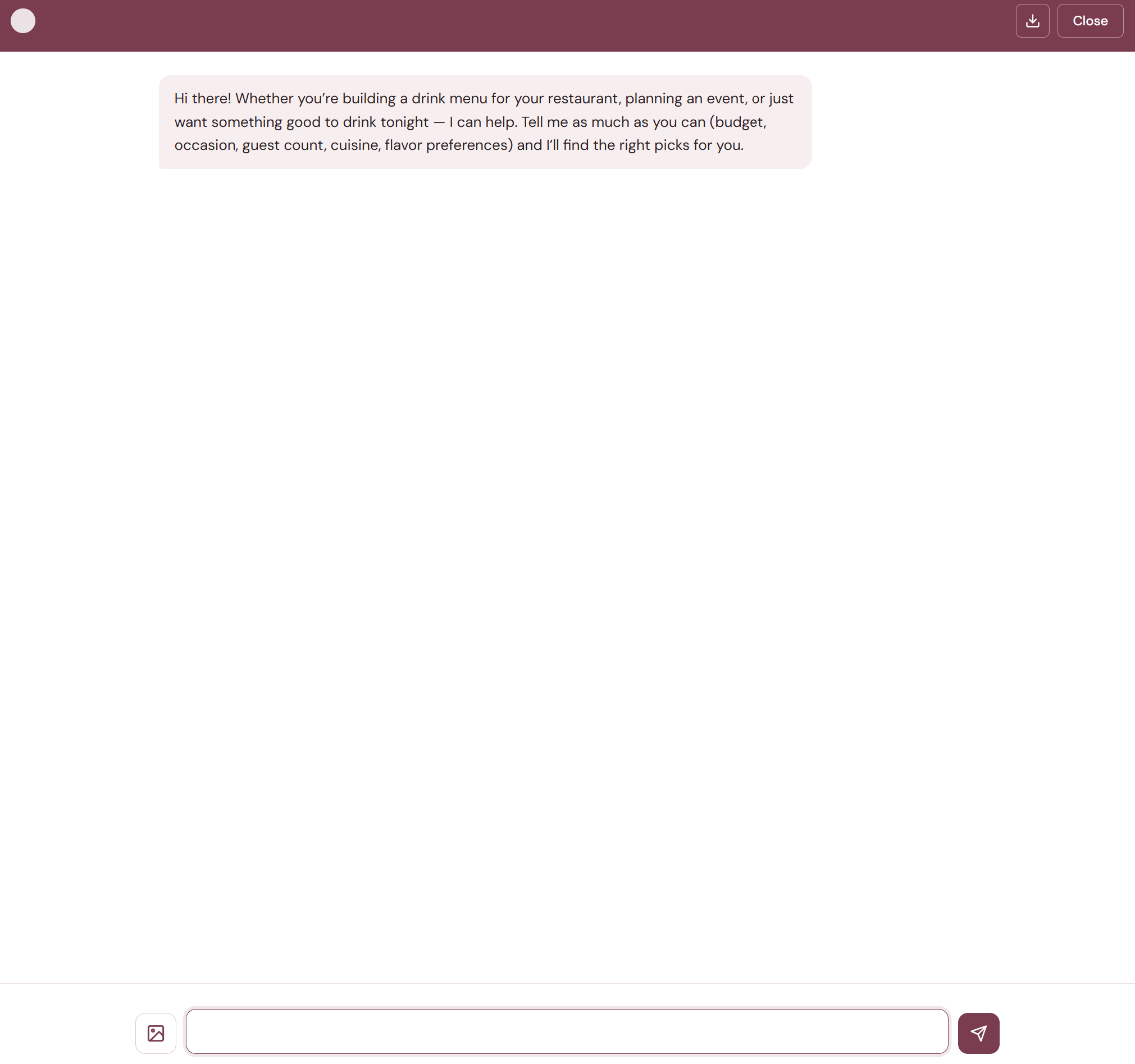
The frontend is deliberately simple: vanilla HTML, CSS, and JavaScript with no build step. The chat interface streams responses via Server-Sent Events (SSE) from the backend.
As the agent works, each tool call appears as a badge in the conversation. You can see which sources are being searched in real time. This transparency matters. You're not just getting an answer from a black box, you can see the research happening.
Users can attach wine label photos or food menu images via a file button, drag-and-drop, or clipboard paste. The frontend downscales images to keep payloads reasonable and shows a thumbnail preview before sending. Every conversation can be saved as a PDF using the download button in the chat header.
Deployment
The agent runs as a split deployment: the static frontend is served by Cloudflare Pages with a Worker proxying API calls, and the FastAPI backend runs on Google Cloud Run, scaling to zero when idle. The same container serves the chat API and the MCP endpoint. The Worker adds a shared secret header on every request so the backend rejects direct access, allowing only traffic through the edge is accepted.
One subtlety worth sharing: behind a proxy, naive per-IP rate limiting silently becomes global rate limiting. The backend sees the proxy as the TCP peer, so every visitor lands in the same bucket, and one busy user can exhaust the limit for everyone. The fix is to have the Worker forward the real client IP in a trusted header (stripping any client-sent value first) and key the limiter on that. Per-visitor limits, no shared bucket.