Five layers
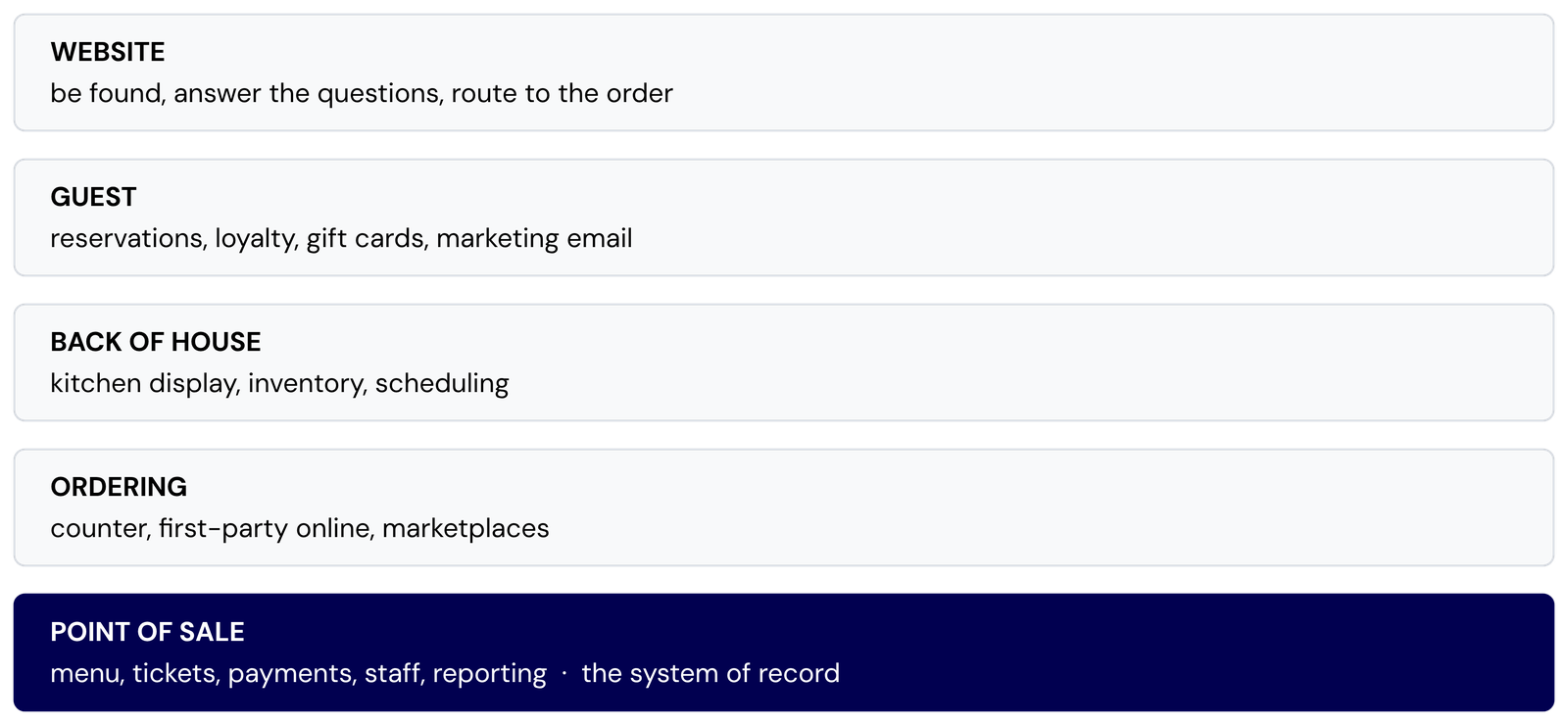
Strip away branding and every F&B stack decomposes into the same five concerns. They are not strict layers in the network-protocol sense, where each one depends only on the one below it. The shape is closer to a hub: the point of sale sits at the centre as the system of record, and the other four groups connect to it, and sometimes to each other, but not in a fixed vertical chain.
Layer 1: Point of sale
Four systems cover most of what we see in Metro Vancouver. They differ less in features than in what they were architected around, and that is what should drive the choice.
| System | Architected around | Choose it when |
|---|---|---|
| Square | A general commerce platform with a restaurant vertical on top. The same account also does retail, an online store, and invoices. | You sell more than prepared food (beans, bottles, merch, wholesale invoices) and want one account behind all of it. Also the shortest path from nothing to taking payments. |
| TouchBistro | The dining room. iPad-native, restaurant-only, built front-of-house first: floor plans, table state, coursing, tableside ordering. | Service happens at tables and the floor plan is the thing staff work from. Toronto-based, so support and tax handling are domestic. |
| Toast | Vertical integration. Its own hardware, with kitchen display, online ordering, payroll and scheduling from the same vendor. | You want one vendor and one contract for the whole stack rather than assembling it. Available in Canada since April 2023, so the local install base is younger than the brand suggests. |
| Lightspeed | Inventory and multi-location. Recipe costing, multiple revenue centres under one roof, and API access on the mid tier and up. | You run more than one location or more than one revenue centre, care about cost of goods at the recipe level, or want to build something custom against the data. Montreal-based. |
Layer 2: Ordering channels
There are three ways an order reaches the kitchen, and they are not variations on one thing. They differ in who owns the customer and in how much integration work they create.
- Counter and table. The basic counter register is native to the POS. QR-code ordering and third-party table-ordering tablets are increasingly common and do require API integration with the POS, but the traditional counter flow remains built in.
- First-party online ordering. Often a module of the POS itself (Square Online, Toast Online Ordering, TouchBistro Online Ordering, Lightspeed Order Anywhere), but not always. Independent ordering platforms such as Olo, ChowNow or BentoBox are common, especially at higher volume, and connect to the POS through an API integration rather than being built in. Either way, the customer record is yours.
- Marketplaces. Uber Eats, DoorDash, SkipTheDishes. They bring their own demand, and the customer stays theirs.
The technical decision is not whether to be on the marketplaces. It is how their orders get into the POS. Left alone, each platform hands you a tablet, and the tablet is a parallel system: a second menu to maintain, a second place to mark items sold out, tickets re-keyed by hand during the rush, and reporting that never reconciles.
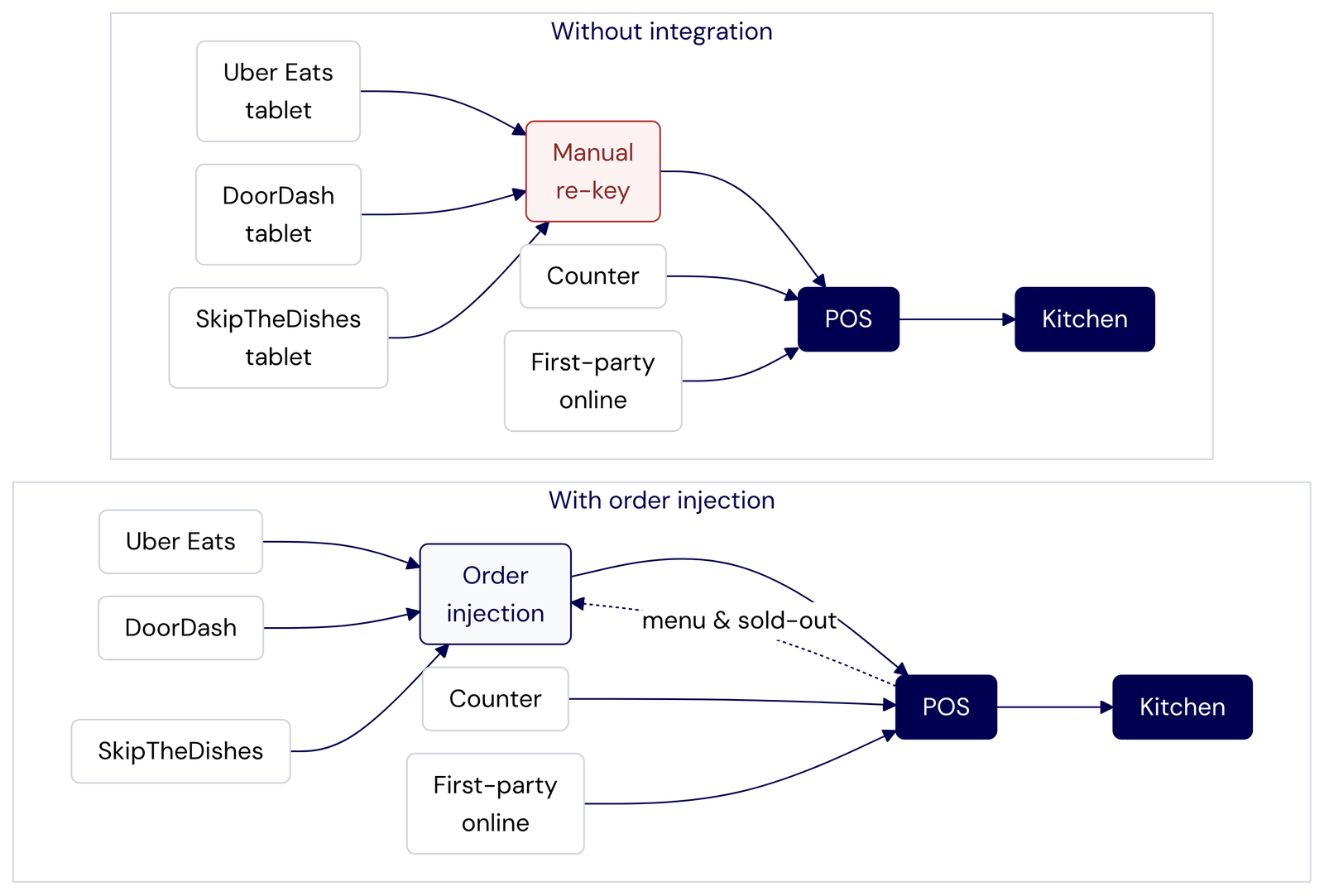
Two things worth knowing before you sign anything. Modern injection middleware handles two-way sync: orders flow in from the platforms, and menu data, pricing and sold-out items flow back out. Menu edits still start in the POS, but the integration carries them to the platforms rather than leaving you to update each one by hand. And British Columbia is the only province with a statutory cap on what these platforms charge for core services, 20% of the order under the Food Delivery Service Fee Act, with anything above that required to be an optional tier you actively chose.
Layer 3: Back of house
This layer is genuinely optional, and it is the one most often bought too early. Three modules, each with a clear threshold:
- Kitchen display. Worth it when tickets need routing, so that a grill station, a cold station and an expo each see only their own items. A single-station kitchen with one printer does not need a screen.
- Inventory and recipe costing. Worth it at high SKU count, at real waste, or when you hold a liquor licence and have to keep records anyway.
- Scheduling and labour. Worth it past roughly ten to fifteen staff, or when shifts vary week to week. Below that a spreadsheet genuinely wins.
Layer 4: Guest
Reservations, loyalty, gift cards and marketing email. The rule here is integration, not features: a loyalty program that cannot redeem at the till is a liability, and a reservation system that does not know table state from the POS just moves the double-booking problem somewhere else.
Reservations are the one layer where going outside the POS is often right, because OpenTable and Resy bring discovery the POS-native tools do not. Loyalty and gift cards are usually the opposite. Take the POS-native version, because redemption happens at the terminal.
Marketing email is the layer with a legal shape in Canada. Under CASL you need consent before a commercial message, clear sender identification, and a working unsubscribe. Under BC's Personal Information Protection Act the guest list itself is personal information, collected for a stated purpose. In practice that means the signup has to be built to capture consent, not just an address, which is a website concern rather than a marketing one.
Layer 5: The website
An F&B website has a narrow job. Be found, answer the four questions (what do you serve, when are you open, where are you, how do I order), and hand the visitor to the right ordering flow. Almost every expensive mistake at this layer comes from rebuilding something a layer below already does.
So the design rule is: own the content and the routing, delegate payment processing. Ordering, payments, gift cards and loyalty all involve card data and tax. Rebuild those flows from scratch and you have taken on PCI scope. Use the POS-hosted checkout, or embed it via an iframe or a tokenised widget, and you have not. That said, delegating payments does not mean the website has to be blind to the visitor. A session that recognises a returning guest, or shows a loyalty balance pulled from the POS API, adds real value without touching card data.
How you hand off to the checkout matters. A bare 302 redirect to the POS platform’s domain works, but it breaks the brand experience and drops cross-domain analytics: Google Analytics and conversion pixels lose the trail when the visitor leaves your origin. An embedded checkout on your own domain, whether through an iframe, a tokenised widget or a custom subdomain, keeps the session intact and the tracking clean. Most of the POS platforms listed above now offer at least one embeddable option.
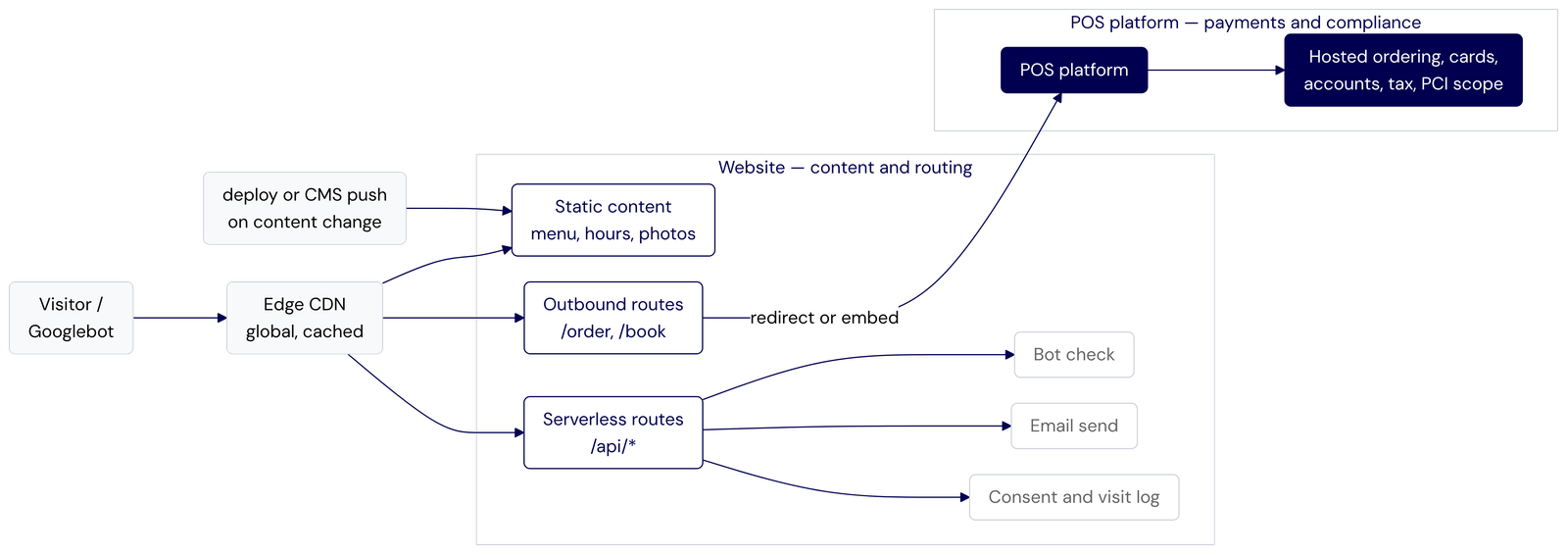
That shape also settles a question we get asked often: how to size the server for the lunch and dinner rushes. The answer is that there is no server to size. Static files are served from cache at the edge, so no origin is in the request path, and the few dynamic endpoints run on request-billed compute that scales per request. A schedule that swaps instance classes by time of day adds a thing that can fail, and it fails at the boundary, which is 11:29 on a Friday.
One thing a purely static build does not cover well is real-time structured data. Google’s local search and Maps panels weight live signals: current open/closed status, today’s specials, real-time reservation availability. A periodic rebuild keeps the baseline accurate, but for those signals a thin dynamic layer, an edge function that injects live JSON-LD from the POS or reservation API at request time, closes the gap without giving up the caching model.
We wrote about this layer in detail, including the spam, security and backend problems we hit building it, in What Broke After Launch.
Which stack for which business
The layers are the same everywhere. What changes is how many of them you need, and which one carries the weight. Here is the shape of each, then the detail.
| Business | Point of sale | Ordering | Back of house | Guest | Website |
|---|---|---|---|---|---|
| Café, bakery, counter service | Retail and food in one catalogue | First-party pickup | None | Gift cards | Menu, hours, map, order button |
| Full-service restaurant or bar | Floor plan and coursing | Dine-in, plus injection if you do takeout | KDS once there are stations | Reservations tied to table state | Booking is the call to action |
| Brewery, winery or distillery taproom | Multiple revenue centres, one ledger | Retail pickup | Inventory, required by the licence | Club list and gift cards | Liquor advertising rules, age gate |
| Food truck, pop-up, market stall | Mobile, works offline | Counter only | None | None | Where we are this week |
| Delivery-only kitchen | Widest integration coverage | Injection is the business | KDS, non-negotiable | The platform owns it | Thin brand page |
| Caterer and private events | Quoting and invoicing over ticketing | No ordering channel at all | Production against event dates | A client list, not a loyalty program | Structured inquiry form |
| Multi-location group | Central menu, consolidated reporting | Injection is mandatory | Configured centrally, run locally | One guest list across sites | Location pages from one source |
Café, bakery, counter service
No floor plan, a high transaction count, a low average ticket, and almost always some retail sitting next to the prepared food: beans, loaves, bottles, merch. That mix, rather than the food, is what should pick the POS.
- Point of sale. Something that treats retail and food as one catalogue, so a bag of beans and a latte are the same kind of object. Square is the natural fit and Lightspeed's entry tier also works. Do not pay for table management you will never open.
- Ordering. First-party pickup ordering is the whole channel. Marketplaces are optional here and often not worth the integration work, because courier economics and a six dollar ticket do not agree.
- Back of house. None. One printer. Inventory only if you also sell wholesale.
- Guest. Gift cards and a simple points program, both from the POS so they redeem at the till.
- Website. Menu, hours, location, one order button. Hours accuracy matters more here than anywhere else, because most visits arrive from a phone map search by someone standing outside.
Skip: kitchen display, reservations, scheduling software.
Full-service restaurant or bar
Service is stateful. A table is an open object for ninety minutes, with items added over time, cheques split and merged, and courses fired in sequence. Every POS difference that matters follows from that.
- Point of sale. Floor plan, coursing, split and merge, tableside ordering. TouchBistro and Toast are built around this; Square reaches it on the paid tier.
- Ordering. Dine-in, phone and takeout. If takeout is a real share of covers, marketplace injection matters, because a re-keyed ticket during a Friday service is where the mistakes happen.
- Back of house. Kitchen display once the kitchen has more than one station. Inventory if the bar program is deep, since liquor is where variance hides.
- Guest. Reservations tied to table state, otherwise you are just moving the double-booking problem. OpenTable or Resy if you want their discovery, POS-native if you already have your own demand.
- Website. Menu, hours, location, parking, and a booking link as the primary call to action.
Skip: deep inventory unless the bar program justifies it, and loyalty, which rarely earns its keep at this visit frequency.
Brewery, winery or distillery taproom
One licence covers several revenue centres at once: pours in the taproom, packaged product off the shelf, tours, private events. The licence also dictates what records you keep and what your website is allowed to say.
- Point of sale. Multiple revenue centres reconciled into one set of numbers. Lightspeed is the natural fit; Square works when retail dominates and the taproom is small.
- Ordering. Retail pickup, and shipping where the licence permits it. Delivery marketplaces are usually beside the point.
- Back of house. Inventory is effectively mandatory, because production and sales records are a licence condition rather than a nice-to-have. Kitchen display only if there is a kitchen.
- Guest. Gift cards and a club or membership list, which is the highest-value list this kind of business can build.
- Website. This is where the compliance lives. BC liquor advertising rules govern what the site can claim and show, and age gating applies. It is the one case where the website layer carries legal risk of its own.
Skip: delivery marketplaces, and table management unless you are running a full dining room alongside.
Food truck, pop-up, market stall
The location changes and the connectivity is not guaranteed. Those two facts eliminate most of the stack.
- Point of sale. Runs on a phone or tablet over cellular and keeps taking payments when the signal drops, syncing when it returns. Offline capability is the one hard requirement.
- Ordering. Counter only. Pre-orders are worth it only once you have a fixed pitch.
- Back of house. None.
- Guest. None. An Instagram account does more work here than any loyalty program.
- Website. One page whose main content is where you are this week, marked up so a search engine and a phone map can both read it. Everything else on the page is secondary.
Skip: everything else. This is the case where the lighter stack is genuinely the better stack.
Delivery-only kitchen
No dining room and no walk-in demand, so the marketplaces are not a side channel. They are the entire front of house, and the stack has to be built around that rather than bolted onto it.
- Point of sale. Whatever integrates cleanly with every platform you list on. Integration coverage matters more than terminal features, because nobody is standing at a terminal.
- Ordering. Injection is not an optimization, it is the business. Three tablets at volume is how tickets get missed and ratings fall.
- Back of house. Kitchen display, non-negotiable. Tickets arrive from several sources at once with no server to sequence them, and prep-time accuracy feeds directly into your standing on each platform.
- Guest. Nothing you own. The customer belongs to the platform, which is the structural trade of the model and worth being clear-eyed about.
- Website. Thin, and mostly there so the brand exists outside the app.
Skip: reservations, floor plan, loyalty.
Caterer and private events
Revenue is a small number of large, scheduled, quoted jobs rather than a stream of tickets. That inverts the whole stack: the layer that usually matters least becomes the one that matters most.
- Point of sale. Matters far less than quoting, deposits and invoicing. Plenty of caterers run well on invoicing plus a simple terminal.
- Ordering. There is no ordering channel. The pipeline is an inquiry, a quote, a deposit and a delivery date.
- Back of house. Production scheduled against event dates. Inventory is per event, not perpetual.
- Guest. A client list closer to a CRM than a loyalty program. Repeat corporate clients are the asset.
- Website. The highest-leverage layer in this business. A structured inquiry form that captures event date, headcount, venue, dietary constraints and budget, and routes by event type, is worth more than every other layer combined.
Skip: kitchen display, reservations, loyalty, marketplaces.
Multi-location group
Every per-site decision multiplies. A tool that is merely annoying at one location becomes an operational tax at six.
- Point of sale. Central menu and price management, consolidated reporting across sites, and role-based access so a manager sees one location while head office sees all of them. API access for anything you need to build yourself.
- Ordering. Injection is mandatory. Three sites across three platforms is nine tablets otherwise.
- Back of house. Kitchen display and inventory configured centrally, operated locally.
- Guest. One guest list across sites. A gift card sold at one location has to redeem at another, which is a harder requirement than it sounds and rules out several otherwise fine tools.
- Website. One site with a page per location, each carrying its own hours, menu variations and ordering link, all generated from a single content source so nothing drifts.
Skip: anything that cannot be managed centrally, however good it looks in a single-site demo.